1. Overview
Secure Debug, as the name suggests, refers to a debugging interface that can be securely managed, allowing only authorized debuggers to perform debugging through proper management.
2. Secure Debug Theory
The Secure Debug mechanism of E3 can be categorized into three control methods based on the level of control:
① For chips in the development mode lifecycle, the debug interface is enabled by default;
② For chips in the mass production mode lifecycle, the debug interface is opened based on permission verification, which includes BootROM control and the JTAG Challenge/Response mechanism;
③ Forced closure of debugging: Permanently disabling the debug port by burning the efuse JTAG_DISABLE bit.
2.1 BootROM Control Method
When the chip powers on, the BootROM program (chip startup code, embedded in the chip) is executed by default. BootROM retrieves the next-level boot image from XSPI/eMMC/SD/UART/USB or other media based on the boot pin configuration. The boot image must comply with the Boot Package format. BootROM then performs secure boot verification on the boot image based on the efuse configuration. If the boot image passes the verification, the system successfully boots the image, allowing the program to run normally. The detailed secure boot process is as follows:
- Calculate the HASH (SHA256) of the public key in the BPT and compare it with the HASH stored in ROTPK1. If they do not match, the boot fails;
- Use the public key in the BPT to verify the signature stored in the BPT. If the signature verification fails, the boot fails;
- Calculate the HASH of each core image and compare it with the HASH stored in the BPT. If they do not match, the boot fails;
- If all the above steps succeed, the core image specified in the BPT is booted.
The above process is the standard BootROM verification flow. Although the image can boot normally, it does not guarantee that the debug port can be opened during Secure Debug. To enable the debug port, the .json file's ctrl field must be set to 0xffffffffffffffff, and the uuid field must match the efuse DID field (this field is user-programmed; note the endianness format). This process is not mandatory for Secure Debug. Secure Debug can bypass the BootROM verification mechanism and use only the JTAG Challenge/Response mechanism for secure debugging of the JTAG port. The detailed process is shown in the diagram below.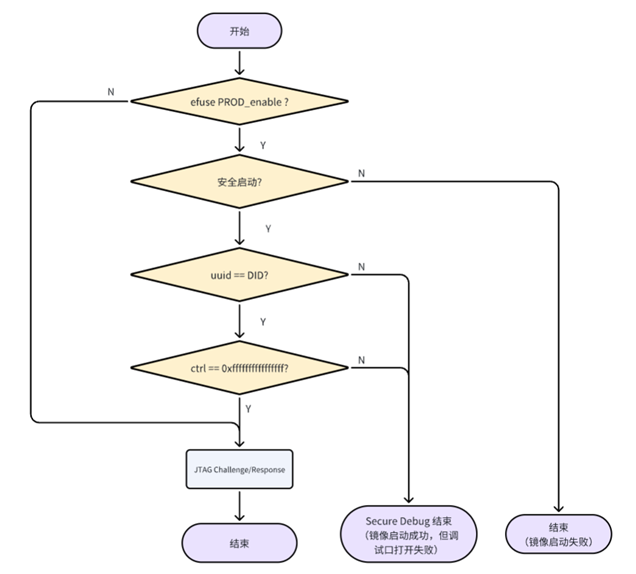
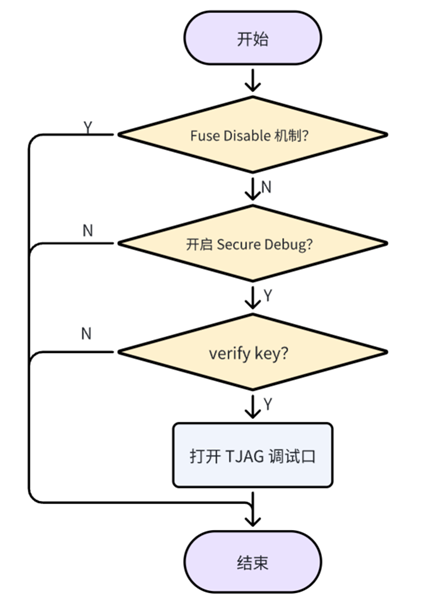
2.3 Fuse Disable Mechanism
By programming the JTAG_DISABLE bit in the efuse, the debug port is permanently disabled. Once programmed, this action is irreversible, and the JTAG_DISABLE control bit has the highest priority, permanently preventing the JTAG debug port from being enabled.
3. Secure Debug Verification Process
3.1 Efuse Programming Verification
3.1.1 Generate PAC Package
Modify the JSON script, set the ctrl field to 0xffffffffffffffff, and ensure the uuid field matches the efuse DID. Use the CMD command line to package it into a PAC file and program it into the Flash. After programming the firmware, set the DIP switch to 0000, power off, and restart to confirm whether the firmware boots normally.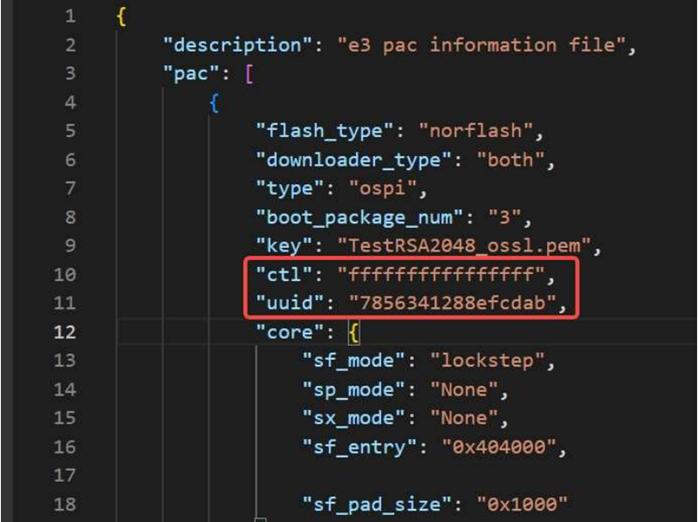
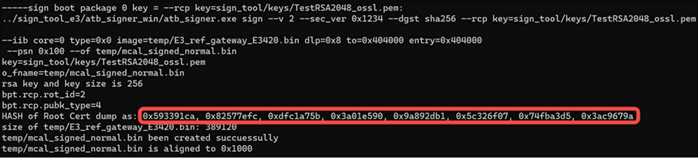
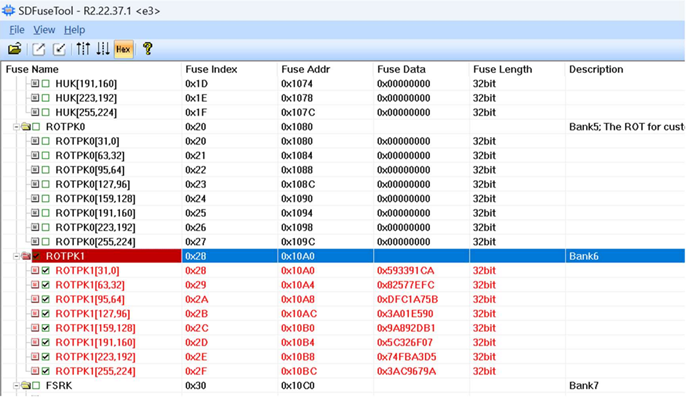
① Program the public key hash. When executing the packaging command, the log area will output the HASH of the Root Cert dump as the public key hash. Save and program it into efuse -> ROTPK1, as shown below;
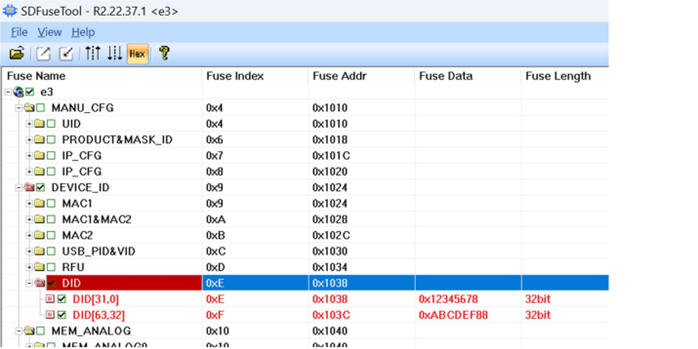
② Program the DID, ensuring it matches the uuid field in the JSON script used to generate the PAC. Pay attention to the endianness.

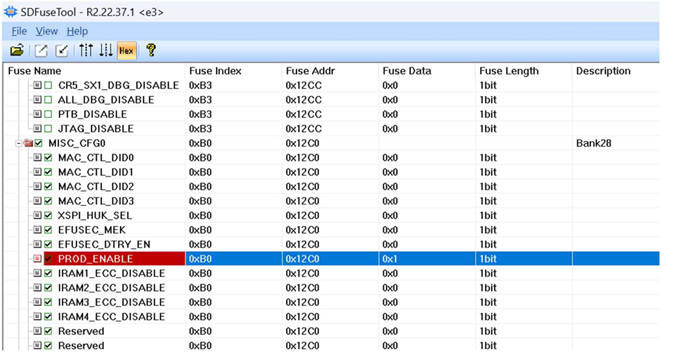
③ Program the PROD bit to enable production mode. In this mode, the chip can no longer be freely programmed or connected to a debugger (only PAC programming via USB is allowed for efuse programming/reading).
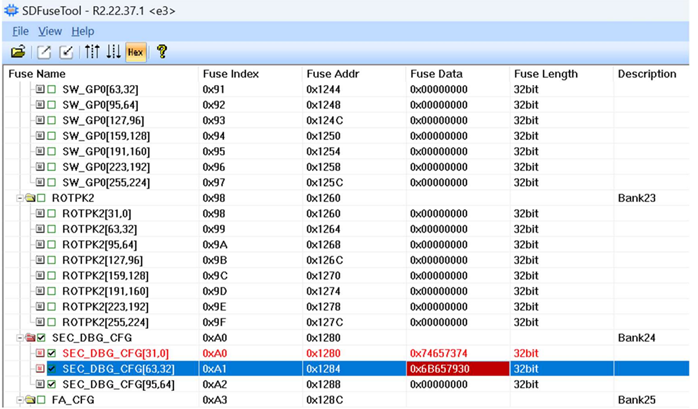
④ Program the DebugKey
⑤ Program the SDBG_MODE bit. After enabling Secure Debug, the JTAG port on the board is protected and can only be reopened by entering a password. (Although the JTAG port is protected, the SDFuseTool tool cannot connect via the JTAG interface and can only read or program efuse via USB.)
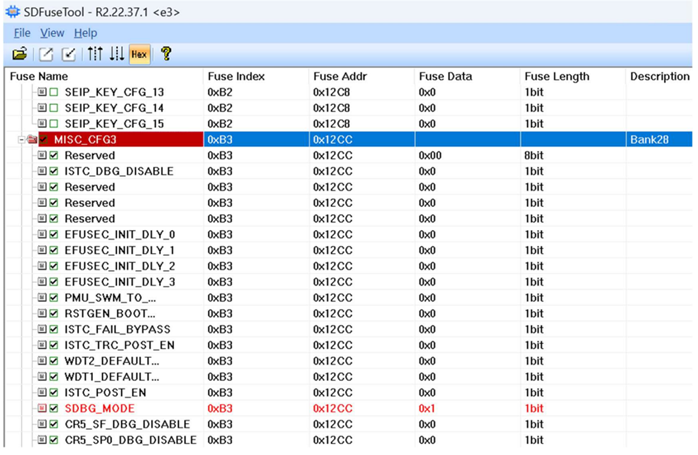
⑥ Lock the key


- The sequence number after Bank corresponds to the LockBank sequence number, i.e., the lock of BankX corresponds to SafeLockBankX and APLockBankX;
- Fuse items in Bank marked with [D] support single-bit modification from 0 to 1. Items without this mark indicate ECC protection functionality, which only supports one-time word-level writing and does not support single-bit rewriting.
- The meanings of HLock, OLock, RLock, and PLock in LockBank:
- PLock: Once set to 1, the corresponding Bank's fuse content cannot be programmed;
- RLock: Once set to 1, the corresponding Bank's fuse content cannot be read by software;
- OLock: Once set to 1, the shadow register content of the corresponding Bank's fuse cannot be modified;
- HLock: Once set to 1, hardware reads of the corresponding Bank's fuse content will always return 0;
4. Secure Debug Unlock
Refer to Secure Debug - Unlock Methods (Coming Soon).
5. Reference Documents《AppNote_E3_Boot_and_OTA_Rev01.06》
《E3 Secure Debug V1.0》
《Semidrive_E3 Information Security_Rev1.0》
《AppNote_E3_Programming Process_Rev2.0》
《SDToolBox_User_Guide》
For further inquiries, please contact the ATU department of WPI Group: atu.sh@wpi-group.com Author: Na Jiu Zhe Mo Di
For more information, scan the QR code to follow us!