Introduction
This article introduces the UART features and parameter configurations of the LKS453, and demonstrates a hands-on experiment using the uart_MCU_send_data demo program. The experiment involves sending data (01-06) from the MCU UART to a serial port assistant and printing it via the serial port.
Hardware Platform: LingAo Chuangxin LKS_EVB_MCU453_V2.0 board, WPI-LPCLINK2 Debugger_V1.0 board
Software Platform: Keil
1. UART Features:

▲ Figure 1: From LKS32MC45x_User_Manual_v1.47
The LKS32MC453 features 3 UART channels, supports full-duplex operation, 8/9 data bits, 1/2 stop bits, odd/even/no parity modes, 1-byte transmit buffer, 1-byte receive buffer, Multi-drop Slave/Master mode, and baud rates ranging from 300 to 115200.
2. Program Analysis
2.1 Demo Function Overview
- main function: Initializes the UART and sends data (01-06).
|
int main(void) { u8 num = 0; uart_init(); // UART initialization for (uint8_t i=0;i<6;i++) // Loop 6 times { num++; // Increment data UART_DelaySendOver(UART1); // Wait for previous data to finish sending UART_SendData(UART1, num); // Send data } } |
uart_init(); function: Initializes the UART clock, sets the UART baud rate to 115200, and configures the UART TX/RX GPIO pins.
|
void uart_init() { UART_InitTypeDef uart1_config; GPIO_InitTypeDef uart1_gpio_config.
uart1_config.BAUDRATE = 115200; // UART baud rate set to 115200 UART_Init(UART1, &uart1_config); // Enable UART clock and configure baud rate
uart1_gpio_config.GPIO_Pin = GPIO_Pin_6; // TX GPIO PIN uart1_gpio_config.GPIO_Mode = GPIO_Mode_OUT; // Output mode uart1_gpio_config.GPIO_PuPd = GPIO_PuPd_NOPULL; // No pull-up/pull-down uart1_gpio_config.GPIO_PODEna = DISABLE; // Disable open-drain uart1_gpio_config.GPIO_PFLT = DISABLE; // Disable filtering GPIO_Init(GPIO2, &uart1_gpio_config); // Configure UART TX GPIO and enable GPIO2 clock
GPIO_StructInit(&uart1_gpio_config); uart1_gpio_config.GPIO_Pin = GPIO_Pin_5; // RX GPIO PIN uart1_gpio_config.GPIO_Mode = GPIO_Mode_IN; // Input mode uart1_gpio_config.GPIO_PuPd = GPIO_PuPd_NOPULL; // No pull-up/pull-down uart1_gpio_config.GPIO_PODEna = DISABLE; // Disable open-drain uart1_gpio_config.GPIO_PFLT = DISABLE; // Disable filtering GPIO_Init(GPIO2, &uart1_gpio_config); // Configure UART RX GPIO and enable GPIO2 clock
GPIO_PinAFConfig(GPIO2, GPIO_PinSource_5, GPIO_AF_UART); // Configure GPIO2 pin 5 as UART RX GPIO_PinAFConfig(GPIO2, GPIO_PinSource_6, GPIO_AF_UART); // Configure GPIO2 pin 6 as UART TX } |
UART_DelaySendOver(UART1); function: Waits for the previous data to finish sending before sending new data.
UART_SendData(UART1, num); function: Sends a 32-bit data value n.
|
void UART_SendData(UART_TypeDef *UARTx, u32 n) { UARTx->BUFF = n; } |
3. Experimental Results
3.1 Operating Environment: As shown in Figure 2, the WPI-LPCLINK2 Debugger_V1.0 board is connected to the LingAo Chuangxin LKS_EVB_MCU453_V2.0 board. The WPI-LPCLINK2 Debugger_V1.0 board uses the CMSIS-DAP Debugger method to program the LKS453 MCU.
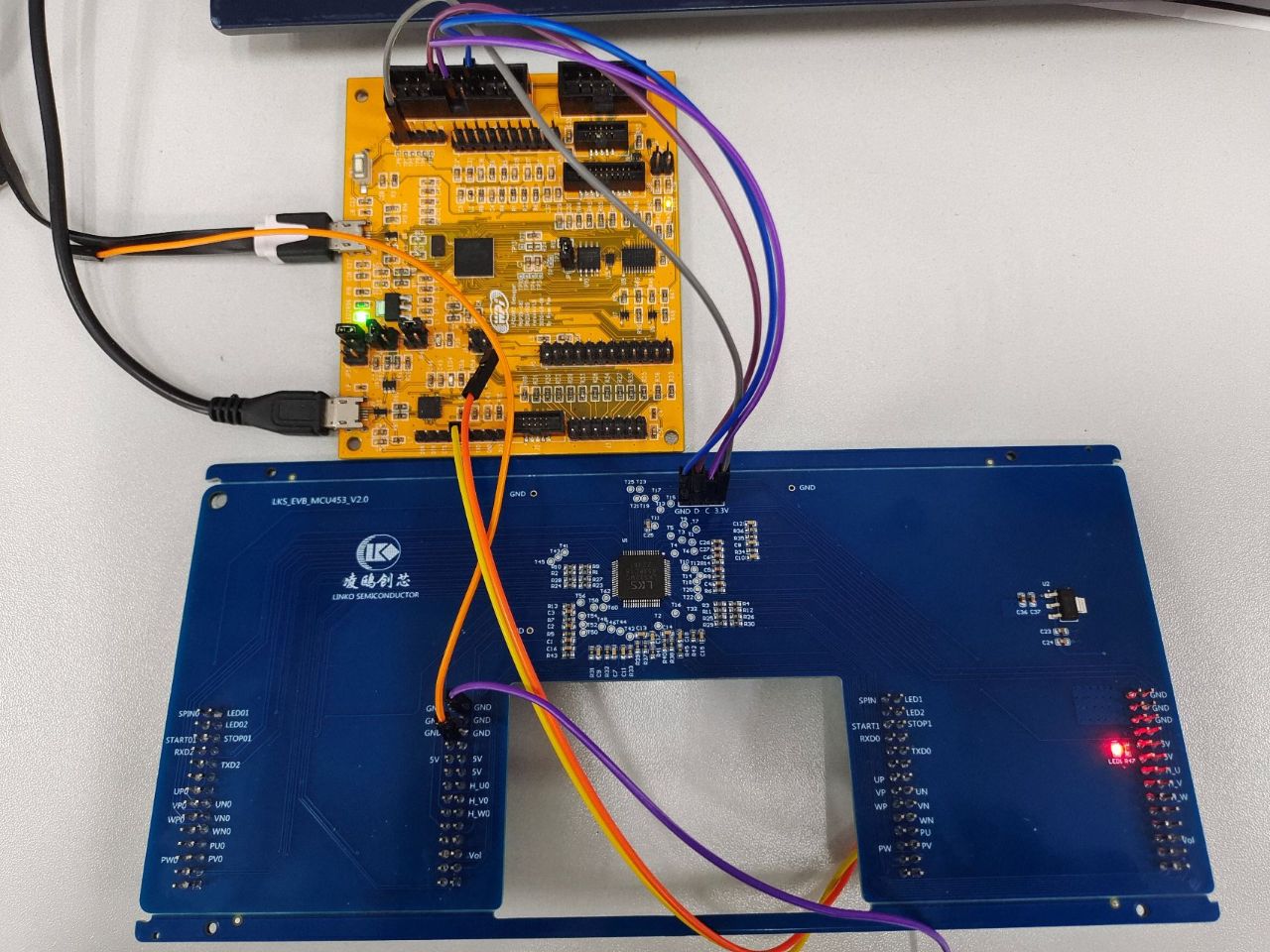
▲ Figure 2: WPI-LPCLINK2 Debugger_V1.0 board connected to LKS_EVB_MCU453_V2.0 board
3.2 Serial Port Assistant Receives Data 01-06:
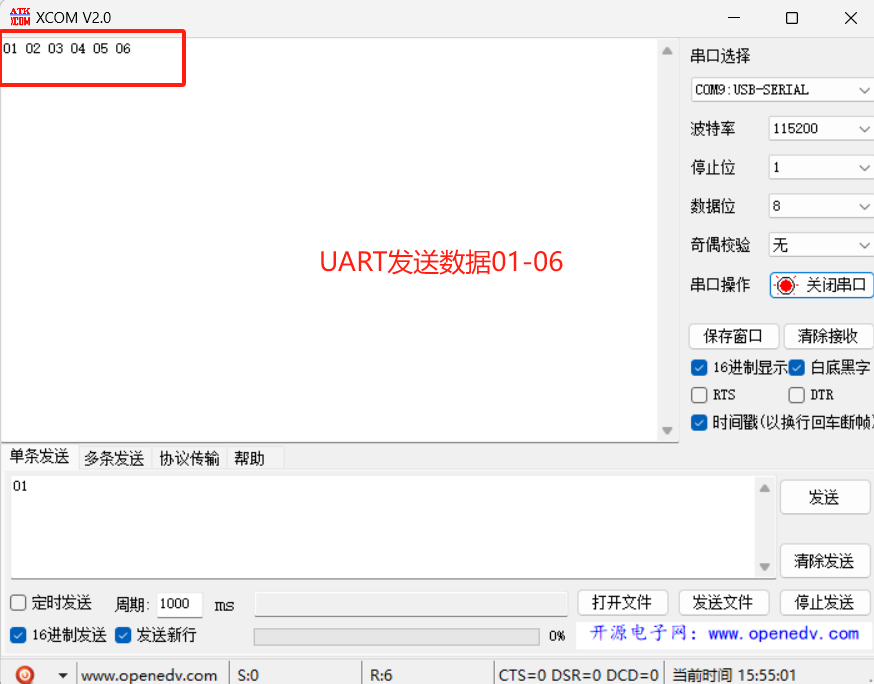
▲ Figure 3: From Open Source Serial Port Assistant (Openedv.com: www.openedv.com)
4. Conclusion
In summary, this article introduced the UART features and parameter configurations of the LKS453. Through a hands-on experiment, the MCU UART successfully sent data (01-06) to a serial port assistant and printed it. This content serves as an introduction to the UART features and parameter configurations of the LKS453 MCU. If you have any questions, feel free to contact us via email at atu.sh@wpi-group.com.
5. References
(1) LKS32MC45x_User_Manual_v1.47
(2) LKS32MC45x_Datasheet_v1.53
(3) Serial Port Assistant: XCOM V2.0 (Openedv.com: www.openedv.com)
(4) SDK: LKS32MC45x_PeripDemo_v2.5
(5) Schematic: LKS_EVB_MCU453_V2.0.SchDoc
Feel free to leave a comment below the blog, and we will respond promptly.
For further inquiries, please contact the ATU department of WPI Group: atu.sh@wpi-group.com Author: Rooted Underground
For more information, scan the QR code to follow us!